Software Station AI for schools
Parents ask. Your school answers.
An assistant on WhatsApp that knows each parent’s children and reads your team sheets, timetables, calendars and newsletters — so “is Sam playing on Saturday?” gets the right answer, at any hour, without a call to the office.
Built with, and running at, Somerset House Primary School.
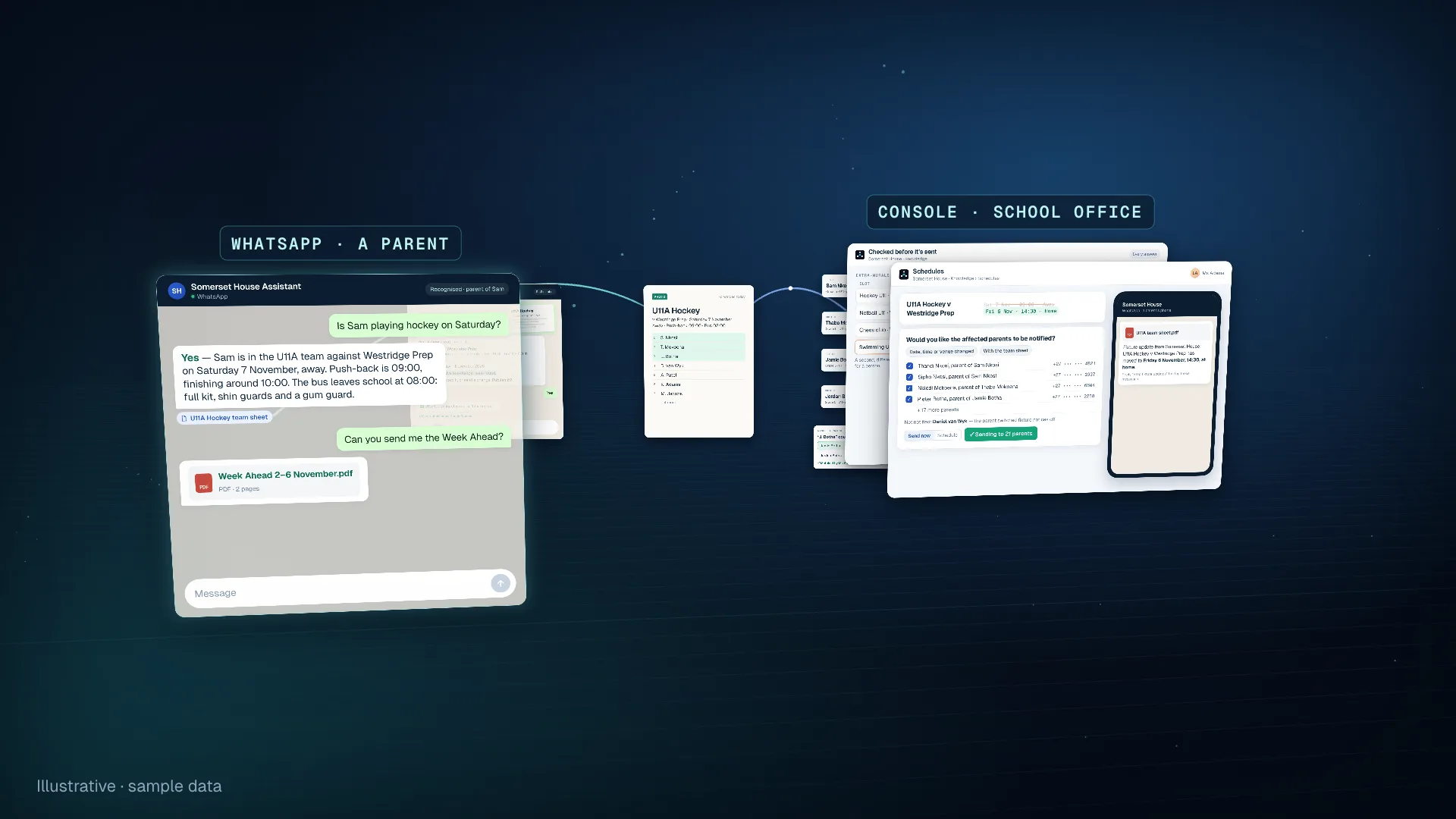
A narrated 58-second film with captions, set at Somerset House with made-up pupils, parents and fixtures. A parent asks on WhatsApp whether Sam is playing hockey on Saturday and is told his team, opponent, venue, times, bus and kit, from the team sheet, then receives the Week Ahead as a PDF. A coach forwards a photo of the team sheet; the assistant reads it back, finds no clashes with what is published, and publishes it when the coach says yes. Each name on the sheet is matched to a child on the roster, and one name that could be two children waits for a member of staff to decide. A timetable is read twice by two different models, a slot where they differ waits for a person, and an answer that cannot be confirmed says so. When the match moves, staff preview which parents will be told and send a WhatsApp notice with the new team sheet attached. It ends on Parents ask. Your school answers.
For parents
The questions the office answers every day. Answered about their own child.
Parents use the WhatsApp they already have. Their number on your roster is all it takes: the assistant knows their children’s names, grades, classes and teams before the first question, so nobody has to explain who they are. A number it doesn’t know is politely turned away.
School assistant
The bus leaves school at 08:00. Full match kit, with shin guards and a gum guard.From: U11 Hockey Team Sheet, 2 November
Matches
“Is Sam playing on Saturday?”
Team, opponent, venue, start and finish, transport and kit — from the latest team sheet, named.
Galas
“Which events is Lerato swimming?”
Every event and lane she is entered in, read from the gala programme.
Squads and ladders
“Where is she on the tennis ladder now?”
The current list, and how it has changed since the earlier ones.
Practice times
“What time does hockey finish today?”
From the weekly timetable, placed by the child’s own age group, grade and class.
What’s on
“Is there aftercare on Friday?”
From the term calendar and the Week Ahead — including what is not on, and closures.
Documents
“Can you send me the uniform policy?”
The file itself, straight into the WhatsApp chat.
Weather
“Do they need a raincoat tomorrow?”
A local forecast that knows weekends, holidays and term dates.
Reminders
“Remind me every Friday at 7 to pack swimming kit.”
Sent on WhatsApp at the time they chose — or only if it’s going to rain.
A note to a teacher
“Tell Sam’s class teacher he’s off sick today.”
An email drafted for the parent to check, and sent only once they confirm.
Team sheets, galas and timetables
From the team sheet to the touchline. Without retyping a thing.
The documents your staff already make — team sheets, gala programmes, squad lists, extra-mural timetables, term calendars and the Week Ahead — are what the assistant answers from. Staff keep making them the way they always have.
- 01
Forward it
A coach or the office forwards the team sheet to the school’s WhatsApp — a PDF or a phone photo — or uploads it in the console.
- 02
Read back to you
The fixtures, the dates they apply to, and anything that clashes with what is already published, in plain words. Then: “Publish it?”
- 03
Names matched to your roster
Every name on the sheet is matched to a child. Two possible children, or none, and a person decides — once, for every sheet after.
- 04
Live when you say yes
Nothing reaches parents until a member of staff confirms. Every publish is recorded as theirs.
- 05
Changes reach the right parents
Moved, cancelled, or a player swapped: the affected parents can be sent a WhatsApp notice with the new team sheet attached, after you preview who gets it.
Or just say it.
Staff can make or change a fixture in a sentence. The assistant works out the date, the venue and the team, asks only what is genuinely unclear, and sends back a draft team sheet on the school’s letterhead to check before anything is published.
Illustrative — a coach on WhatsApp
“U13A against Westridge next Friday, 2pm at home. Same team as this week but swap Thabo for Sipho.”
Draft ready — U13A v Westridge Prep, Friday 13 November, 14:00, home. Team sheet attached. Publish it?
For the school office
Fewer calls to the office. And nothing you can’t see.
Staff work in one console: what parents asked, what they were told, which document each answer came from, and what is still waiting for a person. You decide what parents can be told; the assistant never makes it up.
Schedules
Every fixture, gala, squad and timetable read so far. Correct a row, cancel with a reason, enter a match by hand, or download a team sheet on your letterhead.
Questions waiting for you
What the assistant could not answer with confidence waits here, and staff are emailed a list every few minutes. Your reply can become knowledge for the next parent.
Sources
Newsletters, policies, menus and forms. Each carries the dates it applies to, and an expired one stops answering on its own.
Conversations
Every conversation in full, with which documents each answer came from.
Test an answer
Ask what a parent would ask and see the reply and its sources — nothing is sent to anyone.
Calendar
Your terms and public holidays, offered from your own calendar documents, so “school day” means what it means at your school.
Quality
Conversations scored against a rubric your school can tune, with an email when a score falls low.
Team
Invite staff and choose what each may do. Those you trust with knowledge can publish from WhatsApp too.
Safeguards
Built for children’s information. Wrong is worse than “I don’t know”.
A school can’t afford an assistant that guesses. These rules are written into the platform, not into a prompt, and hold whatever the assistant is asked.
Parents are recognised, not assumed
A child’s details open only to a number on your roster, vouched for by WhatsApp. A typed name or number proves nothing, and website visitors stay anonymous.
It never guesses a child
Two parents sharing one number, or a name that could be two children, and it stops and asks a person rather than pick one.
It says when it can’t confirm
Answers are graded before they are sent; below the bar, the parent is told plainly and the question waits for staff. “Not playing” is said only once every sheet for that day has been read.
Every timetable read twice
A second, different AI model reads each timetable again. Where the two disagree, that slot waits for a person instead of reaching a parent.
Checked the way a parent asks
On the live service, each new timetable is put to the assistant as a parent would ask about it, and the times it gives are checked against the page.
Sensitive matters kept apart
Bullying or a wellbeing worry is handled by its own specialist and listed for your administrators to review. It never surfaces in an unrelated chat.
No first message without consent
The school messages a parent first only under a permission they gave and can withdraw — “Stop fixture updates” works at any time.
Forgetting means forgetting
On request, a person’s words are removed from every live store, and stay removed even after a backup is restored.
Not a doctor, lawyer or bursar
Medical, legal and payment questions are declined and pointed to the right professional or the school office.
Running today
Built with Somerset House Primary School.
Somerset House, in Somerset West, is where this was built and where it runs. Its parents ask on WhatsApp; its office and coaches keep making the team sheets, timetables and newsletters they always made. What the school taught us — how it names its teams, how it pairs its age groups, what “school day” means on its calendar — is set up as the school’s own, not bolted on.
Your school gets the same platform, set up the same careful way for how you do things.
Set up at Somerset House
- Parents recognised from the school’s own roster, children, grades and classes included
- Team sheets, gala programmes, squads and tennis ladders read as they arrive
- Extra-mural timetables, term calendars and the Week Ahead
- The school’s terms and public holidays, kept by the school in its console
- How the school pairs age groups for sport, so a child on a combined team is still found
- Friends of Somerset House events labelled as family events
- Staff publishing team sheets and notices from WhatsApp
A free pilot
See it working at your school. Before you commit to anything.
Every school is set up by our team, with yours — that is how the answers come out right. A pilot is the way to find out what it does for your parents.
01
Talk to us
Tell us how parents reach your school today and what they ask most. We’ll tell you honestly whether we can help.
02
We set your school up
We connect your parent roster, your calendar, your documents and a WhatsApp number, and teach the assistant how your school names its teams and grades.
03
Try it with real parents
Your staff and a group of parents use it for real questions, while you read every conversation in the console.
04
Decide
Carry on, change what it does, or stop. The pilot costs your school nothing.
FAQ
A few practical questions.
1.What do parents need?
WhatsApp, and their number on your school’s roster. There is nothing to download and nothing to sign up for. Both parents are recognised, and a family with several children is one conversation.
2.Where does the roster come from?
From the list your school already keeps. At Somerset House it is read from the school’s own spreadsheet, so a change there reaches the assistant without anyone retyping it. Connecting yours is part of setting up a pilot.
3.Can we send an announcement to every parent?
Not as a general broadcast today. What the school can send is a fixture notice: when a match is moved or cancelled, or a team changes, the parents of the children affected can be told on WhatsApp, with the new team sheet attached. Staff preview who will get it and approve each send, and it goes only to parents who have agreed to fixture updates.
4.Can parents be reminded about their child’s matches?
Parents can set their own reminders — at a time, every week, or only if it is going to rain. For now, a reminder does not look up team sheets or timetables when it is sent; for a match, parents ask the assistant, which answers from the latest sheet.
5.What happens when a parent needs a person?
The assistant can email the right member of staff for them, drafted for the parent to check and sent only once they confirm. Questions it could not answer with confidence wait in your console, and your staff are emailed a list of them every few minutes.
6.Is it only for sport?
No. Sport is where the documents change fastest, so it is where the assistant saves the most calls. It answers from anything you give it — newsletters, policies, menus, term calendars, forms — and sends the documents themselves when a parent asks.
7.Where is our data kept?
Every lookup and every action names the one school it is for, and a missing or wrong school returns nothing. Records and documents are stored in the EU, in AWS’s Ireland region; the AI model providers that generate answers process requests outside it.
8.What does it cost after the pilot?
The pilot is free. If you carry on, usage is charged at Software Station AI’s published prices — in US dollars, $0.05 for each message from a parent, and $0.10 a document plus $0.01 a page for what the assistant reads — and setting up your school is quoted separately.
Contact us
Start a free pilot.
Tell us about your school and we’ll reply within four working days to talk through a pilot: what we would set up, with whom, and for how long.
The pilot costs your school nothing. We can’t take on every school at once; if we can’t help yet, we’ll tell you.
Rather not use the form? Ask the assistant or email us. However you reach us, we’ll reply within four working days.